Drag and drop shifts
Move scheduled work around the visual rota as plans take shape.

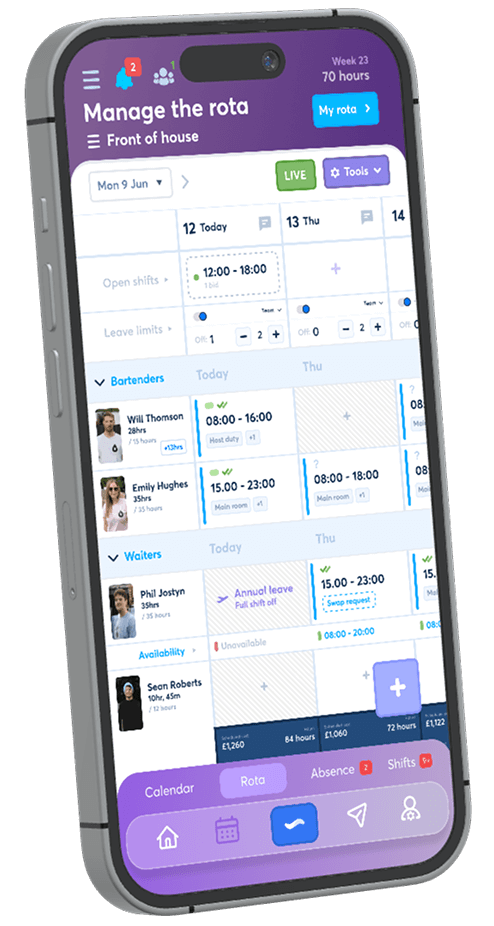
Create a clear working week by dragging shifts around the rota, duplicating repeated work and seeing each employee’s scheduled hours as you build.
FlowRota brings availability, shift rules alerts, clash checks, open shifts, employee swaps and rota notifications into the same practical scheduling view.
FlowRota keeps every scheduling decision connected. Managers can create the work, assign the right people, respond to live warnings, offer uncovered hours and tell employees when the finished rota is ready.


Build quickly without losing the information that makes a schedule realistic, affordable and easier for employees to follow.
Move scheduled work around the visual rota as plans take shape.
Reuse an existing shift instead of entering the same details again.
See when employees can work and spot conflicting assignments.
Review clash checks, leave blocks and working-rule warnings in the rota.
Offer open shifts or let employees arrange controlled shift swaps.
Tell staff when the rota is ready and when their own shift changes.
The rota stays at the centre of the task. Managers can create a shift, move it to a different place and duplicate it when the same work needs scheduling again.
Start with one complete shift, then drag, drop and duplicate it across the rota. The copied record provides a practical starting point for the next assignment while the manager remains in the weekly schedule.
A shift can carryExplore everything that can be recorded on FlowRota shifts .
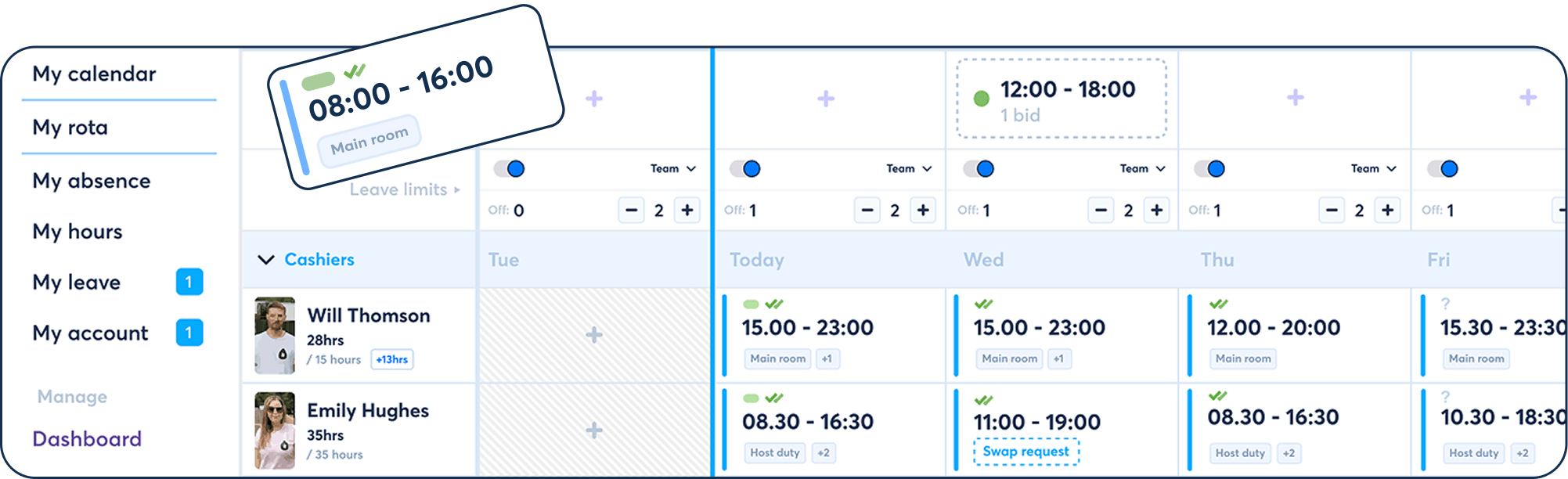
Useful scheduling context appears alongside the work being assigned, helping managers make a better-informed choice while there is still time to change it.
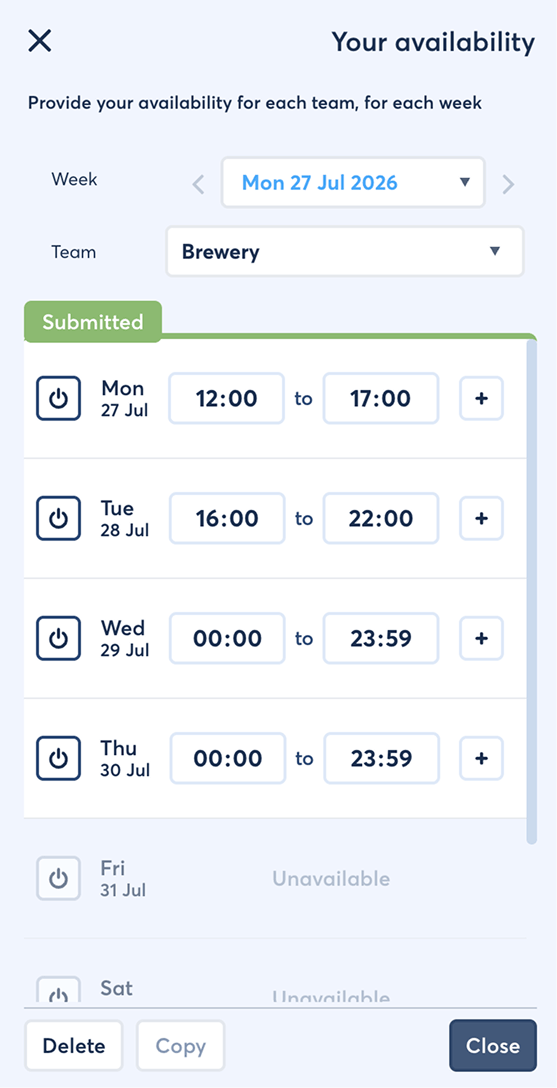
Use availability submitted by employees when deciding who can cover each part of the week.
FlowRota canLearn how to collect and schedule around employee availability .
Compare the hours an employee is contracted to work in the week with the hours currently assigned.
Managers can see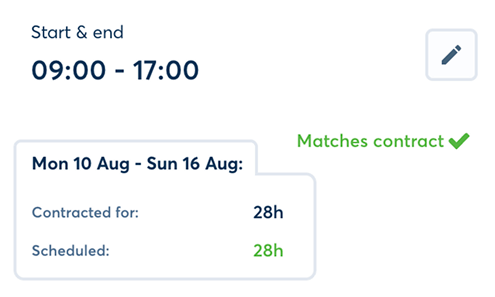
For hourly-paid employees, see what a scheduled shift will cost and what the employee will earn.
The calculation can reflect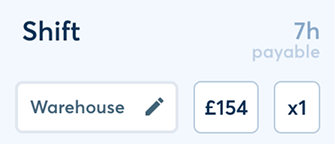
FlowRota checks each assignment against several kinds of scheduling information and brings potential problems to the manager’s attention in real time.
| Check | What FlowRota compares | What the manager can spot |
|---|---|---|
| Availability warning | The shift and availability submitted by the employee | Work proposed when the employee says they are unavailable |
| Clash check | The shift and the employee’s other assigned shifts | Two shifts that overlap each other |
| Rules warning | The shift pattern and the team’s configured work rules | Insufficient rest, a long shift or a shift without a break |
| Leave or absence block | The shift and recorded time away from work | Work scheduled while the employee is recorded as off |
Configure local rules for areas such as minimum rest between shifts, maximum shift duration and required breaks. FlowRota can then alert the manager when a rota pattern may break those rules.
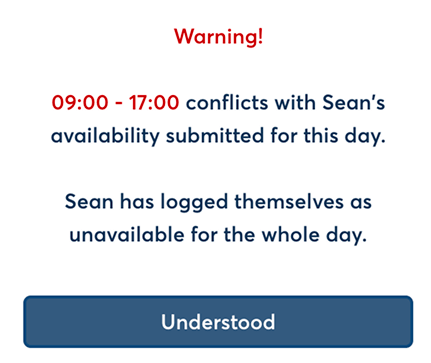
See how rota rules and live warnings support the scheduling review.
An employee cannot be in two places at once, and recorded leave should not quietly disappear beneath a new shift. Dedicated warnings make both conflicts easier to see.
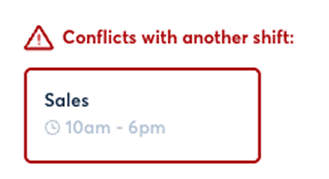
Explore shift clash checks , leave management and absence periods .
Warnings help managers identify a potential scheduling problem. They support review and decision-making; they do not replace the employer’s responsibility to apply the correct rules and legal requirements.
Use open shifts when work needs an employee, or enable shift swaps when employees want to reorganise already assigned work.
Make a shift unassigned and offer it to eligible staff in the team. Employees can claim or bid for it while its times, duties, notes and location remain attached.
Choose how it is filled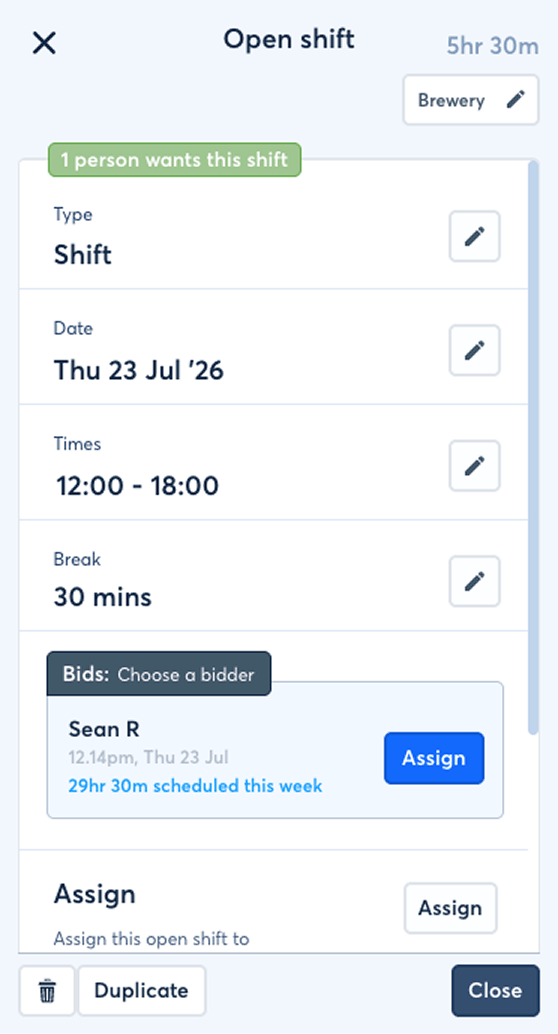
Explore the complete open-shift workflow .
Where swaps are enabled for the team, an employee can request a same-team exchange or offer to take another employee’s shift without giving one back.
Keep the process controlled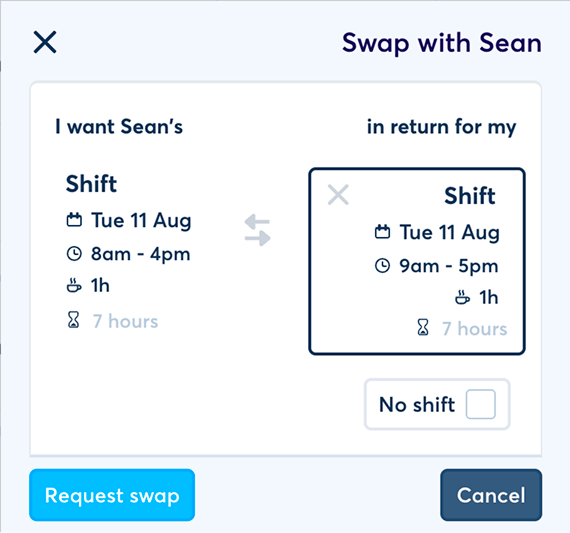
See the full employee shift-swap process .
| Cover route | Best used when | Manager control |
|---|---|---|
| Open shift | Work is unassigned and needs an eligible employee | Use automatic assignment or choose between employee bids |
| Shift swap | An assigned employee wants another employee to take or exchange work | Allow automatic swaps or require manager approval |
The rota stays easy to scan while each shift holds the detail needed to run, pay and explain the work.
Set scheduled work as a standard shift, paid overtime or overtime whose duration is added to the employee’s TOIL balance.
TOIL can then supportCompare paid overtime and Overtime - TOIL .
Give each assignment enough context for the employee to understand where they are working and what is expected.
Add details such asKeep the planned shift connected to what happened: clocked time, a late start, paid leave or full and partial absence.
The shift can recordExplore GPS clock-ins and shift absence records .
Scheduling is only useful when staff know what they are expected to work. FlowRota connects publishing and change notifications to the manager’s rota workflow.
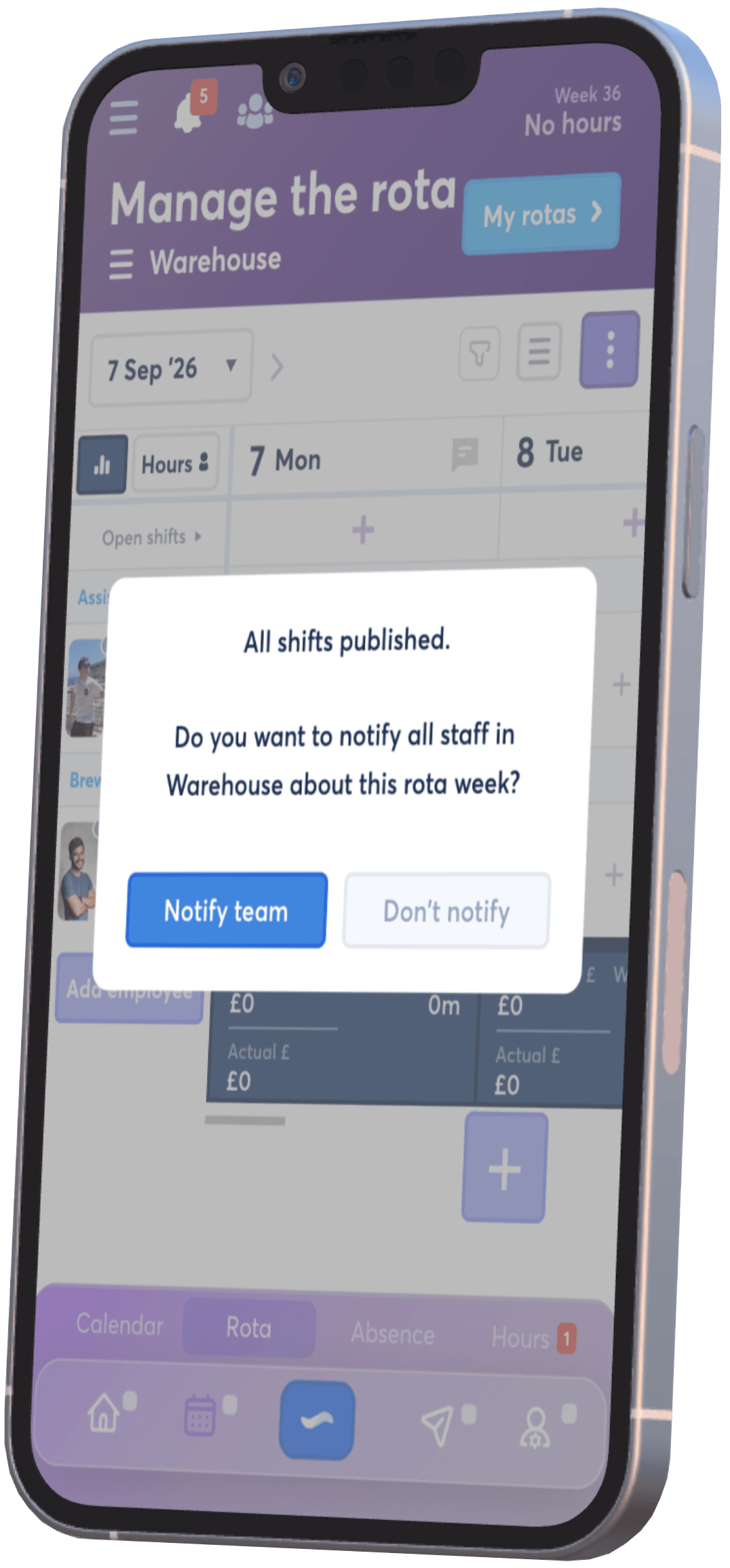
Once all shifts for the week are published, FlowRota asks whether the manager wants to notify staff that their rota week is ready. If a manager later changes one employee’s shift, they can choose to notify that employee separately.
Notifications can includeLearn more about rota alerts and push and email notifications .
The same records used to build and run the schedule feed FlowRota’s reporting view, reducing the need to reconstruct the working month by hand.
Review scheduled and worked hours alongside the resulting pay and time balances.
Connect scheduled work to time away, attendance and operational cost.
 Plan once, report from the same records.
Explore the full set of
hours, pay, leave and spend reports
.
Plan once, report from the same records.
Explore the full set of
hours, pay, leave and spend reports
.
FlowRota combines quick visual editing with the checks, cover options and detail managers need once the rota becomes real work.
Drag, drop and duplicate detailed shifts instead of recreating every assignment from scratch.
Review availability, clashes, rules and time-away warnings before the schedule is published.
Let eligible employees claim open work or request controlled same-team swaps.
Give every shift its team, location, duties, pay treatment and instructions, then notify the people affected.
Go deeper into the connected tools that help managers build, validate, fill and communicate the rota.
FlowRota staff scheduling brings employee shifts, teams, availability, pay, warnings, cover changes and publication into one live rota workflow.
Yes. Managers can drag and drop shifts around the rota and duplicate existing shifts to schedule repeated work more quickly.
Yes. Managers can view availability while building the rota and receive a warning when a proposed shift conflicts with information supplied by the employee.
Yes. FlowRota shows the employee’s contracted hours, currently scheduled hours and the remaining difference for the week.
FlowRota can warn about insufficient rest between shifts, excessive shift duration, missing breaks, overlapping assignments, availability conflicts and work scheduled during leave.
No. Clash checks identify overlapping assignments for the same employee, while working-rule warnings review patterns such as rest, break and shift-duration rules.
Yes. Managers can publish an unassigned shift for staff in the team to claim or bid for, using automatic assignment or manager selection.
Yes. Where enabled for the team, employees can request same-team exchanges or take another employee’s shift, with automatic or manager approval.
Yes. After all shifts are published, FlowRota asks the manager whether staff should be notified that their rota week is ready.
Yes. When a manager changes a shift, they can choose to notify the affected employee by push or email according to the employee’s settings.
Yes. Shifts can include pay rates, cost information, duty tags, notes, roles and work locations within the team.
Yes. FlowRota reports bring together employee hours, pay, overtime, TOIL, leave, absence, lateness, team spend and location spend.
FlowRota costs £1 per user per month after a 30-day free trial. No credit card is required to start the trial. Visit the pricing page for full details.
Drag and drop the shifts, check the schedule, fill the gaps and publish a clearer working week. The trial is free for 30 days, no credit card is required, and continued access costs just £1 per user per month.
Start your free trial