A clearer attendance trail
Keep clock-in time, clock-out time and location context together on the employee’s clocking record.

Let employees clock in and out from their phone, attach location context to each clocking record and give managers worked-time information they can review.
FlowRota connects mobile clocking with rotas, clock cards and timesheets. Businesses get a more dependable record of when work started and finished, can record lateness and can apply approved differences between scheduled and clocked duration to an employee’s TOIL balance—without buying specialist clocking hardware or reconstructing hours from paper at the end of the month.
A start time is more useful when a manager can see how it was recorded and where the employee’s device placed the clocking action. FlowRota’s GPS clock-in feature keeps that context attached to the clock card, ready for review before worked hours move into timesheets and payroll preparation.
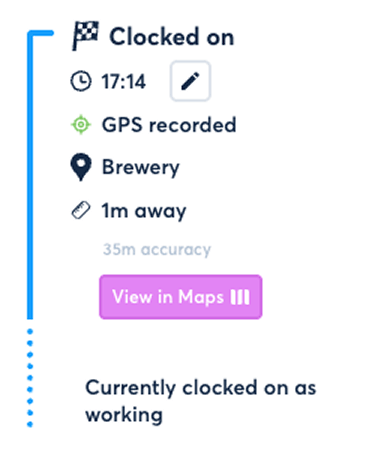
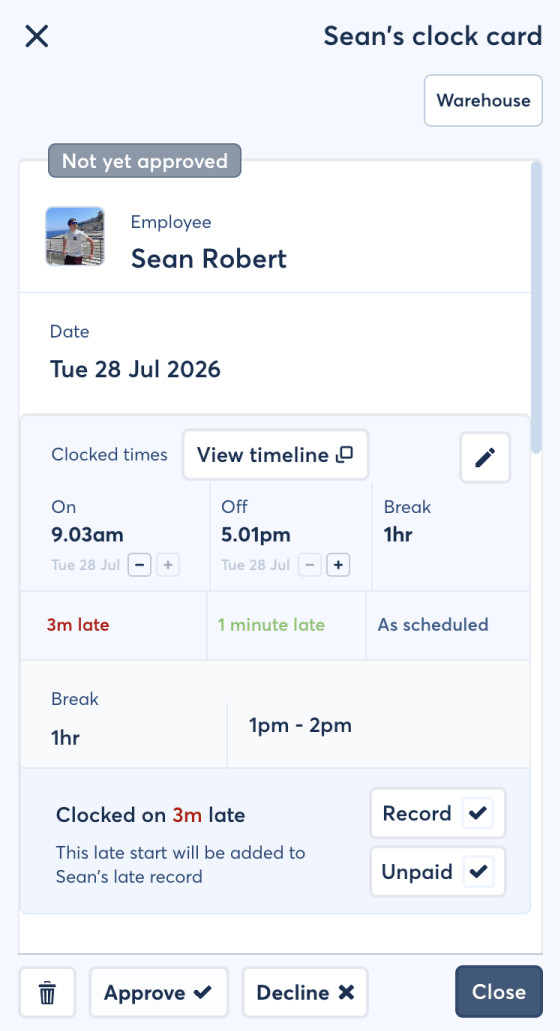
The value is not GPS for its own sake. It is having better evidence behind worked hours, fewer manual records to reconcile and a clocking process employees can use on the device they already carry.
Keep clock-in time, clock-out time and location context together on the employee’s clocking record.
Start with captured clocking information instead of asking managers to recreate every worked shift from memory.
Employees can clock in from a compatible phone, helping growing businesses avoid another device to install and maintain.
Give managers useful context when employees clock at different workplaces, venues or customer locations.
Compare approved clocked duration with the scheduled shift and apply the excess or shortfall to the employee’s TOIL balance.
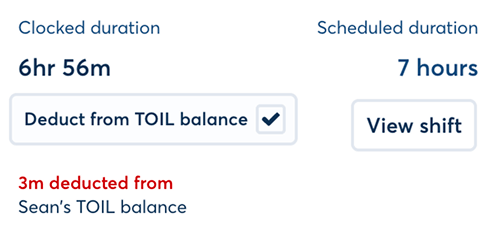
Record late arrivals during clock-card review instead of leaving attendance exceptions in messages or handwritten notes.
A time clock only works if employees can use it consistently. FlowRota keeps the action straightforward, while the supporting records give managers more detail than a handwritten arrival time.
Employees can use mobile clocking where it has been enabled for their team. Each clock-on and clock-off action is kept as part of the relevant work session rather than being left in a separate attendance system.
Features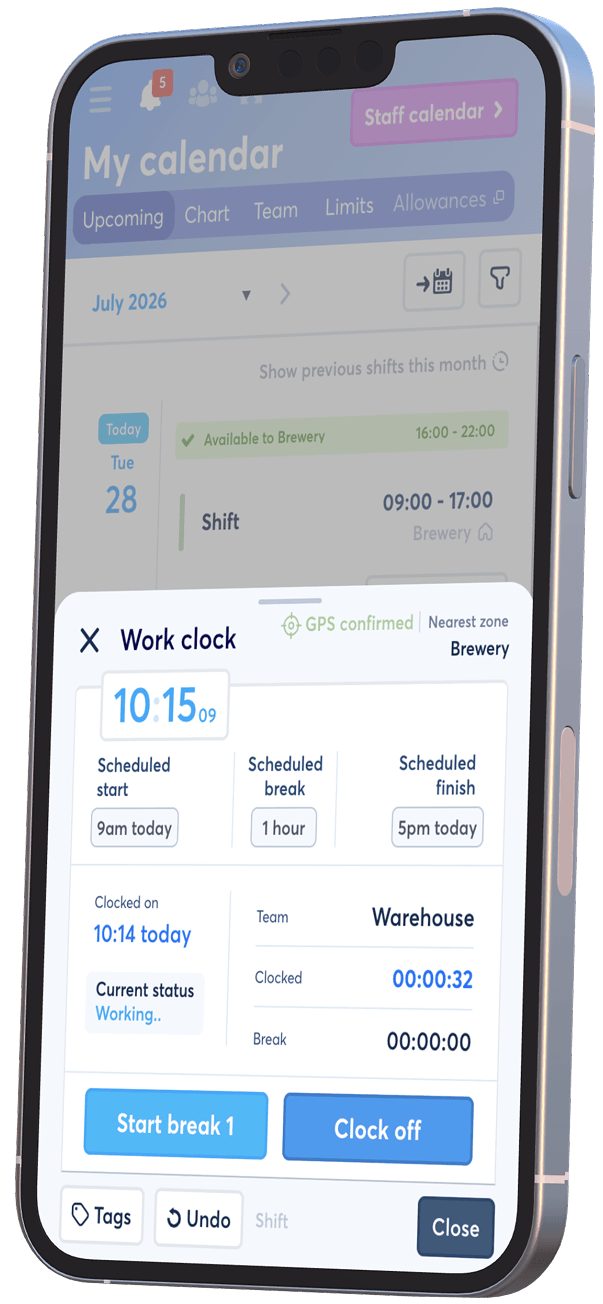
The process is designed to remain quick for employees while creating enough information for a sensible manager review.
The employee opens FlowRota on their phone and uses the clock-on action when their working time begins.
FlowRota records the time and attaches the location supplied by the employee’s device to that clocking action.
A second action records when work finishes, creating a clock card for the completed session.
The manager checks the times against the scheduled shift, records lateness or other exceptions and decides whether an approved duration difference should be applied to TOIL.
 Planned and worked time stay connected.
Managers can compare what the
staff rota
expected with the clocking record that was actually created.
Planned and worked time stay connected.
Managers can compare what the
staff rota
expected with the clocking record that was actually created.
Clocking data should support payroll preparation, not bypass the checks that make it dependable. FlowRota gives managers a review stage where scheduled and recorded duration, breaks, lateness, TOIL and other exceptions can be considered before information is exported.
Managers can see the times recorded for an employee’s session and use the attached clocking information to understand what happened.
FeaturesBenefit: Give managers one record to review instead of piecing together times from paper, messages and separate systems.
Real teams occasionally forget to clock out or record a time incorrectly. Automatic clock-off options and authorised manager amendments provide a controlled way to resolve those exceptions.
FeaturesBenefit: Prevent one missed tap from leaving an open-ended session or delaying the whole timesheet review.
Reviewed hours can feed into timesheets alongside breaks, overtime and different rates. Approved excess or shortfall can also be applied to the employee’s TOIL balance, helping the next stage of payroll preparation begin with cleaner information.
FeaturesBenefit: Spend less time reconstructing hours at the end of the pay period and more time checking genuine exceptions.
A clock card becomes more useful when it can be compared directly with the scheduled shift. During review, managers can see whether the employee worked for longer or shorter than planned, apply the approved difference to TOIL and record any lateness without calculating or recording the same information elsewhere.
When an employee’s approved clocked duration exceeds the scheduled shift duration, the excess can be added to their TOIL balance. The adjustment is based on the reviewed difference between planned and worked time.
ExampleAn employee scheduled to work 8 hours clocks an approved duration of 8 hours 30 minutes. The 30-minute excess can be added to their TOIL balance.
When an employee’s approved clocked duration is shorter than the scheduled shift duration, the shortfall can be deducted from their TOIL balance in line with the organisation’s policy and manager approval process.
ExampleAn employee scheduled to work 8 hours clocks an approved duration of 7 hours 45 minutes. The 15-minute shortfall can be deducted from their TOIL balance.
If an employee clocks in after their scheduled start time, the lateness can be recorded as part of the manager’s review. This keeps the attendance exception visible even if the employee stays later and ultimately works their full scheduled duration.
Why it mattersLateness records the delayed start; a duration difference records how much time was worked overall. Keeping them separate gives managers a more accurate account of the shift.
Review first, then update the balance.
Managers retain control over whether an excess or shortfall is
approved and applied to TOIL, helping the balance reflect confirmed
worked-time differences rather than unreviewed clocking data.
Mobile GPS clocking is useful when employees work across different sites. A shared workplace clock-in terminal can be a better fit when everybody arrives at one workplace. FlowRota supports both approaches, so the process can follow the way the team actually works.
Employees use their own compatible phone and the location supplied by the device is attached to each clocking event.
Best suited toStaff clock in and out from one tablet or workplace device while each employee’s attendance record remains separate.
Best suited toA workplace tablet can provide one visible clocking point without returning to paper. Employees identify themselves at the terminal, while managers retain visibility over active sessions and individual clock cards.
Benefits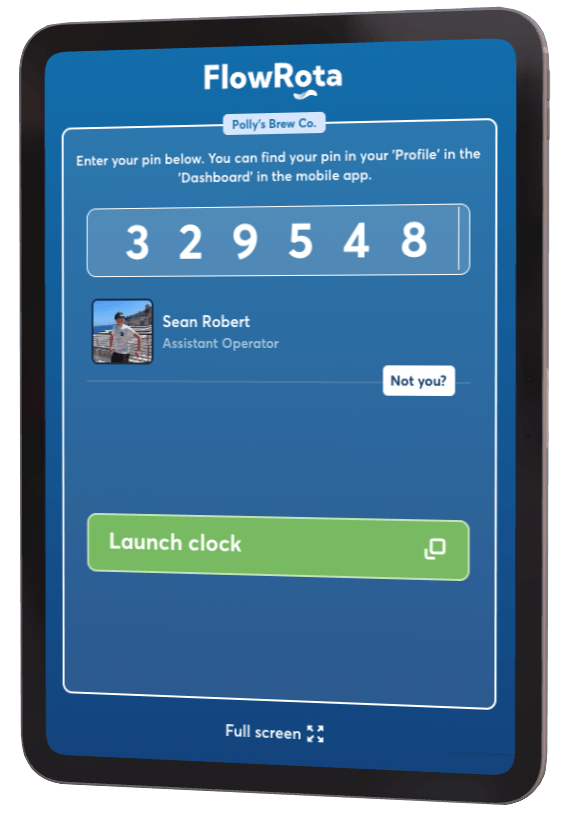
Location data needs a clear purpose. FlowRota uses the location supplied by the employee’s device to add context to a specific clock-in or clock-out action. The feature is not intended to follow an employee’s movements throughout their shift.
Employers should explain what location information is collected, why it is needed, who can access it and how long it is retained. Device location can also be affected by settings, signal and accuracy, so GPS information should support manager review rather than be treated as infallible proof on its own.
FlowRota provides tools for recording and reviewing clocking information. Each employer remains responsible for using employee data lawfully, proportionately and in line with its own privacy notice and workplace policies.
Each method can record hours, but they differ in the context they capture and the amount of administration they create.
| Method | How it works | Practical advantage |
|---|---|---|
| Mobile GPS clocking | An employee clocks on and off from their phone, with device location attached to the clocking events. | Provides useful location context for employees working across different sites without specialist hardware. |
| Shared terminal clocking | Employees use a common tablet or workplace device to create their individual clocking records. | Gives an on-site team one consistent clocking point without requiring personal phones. |
| Manual timesheets | Employees or managers enter worked hours after the event, normally from notes, paper or memory. | Can be simple for very occasional work, but creates more manual entry and less evidence around the original times. |
Mobile clocking is particularly useful when a conventional wall clock cannot serve every employee. The same review workflow can still support a business with one site, several branches or changing work locations.
Record start and finish times for bar, kitchen, event and venue staff, then compare attendance with the published schedule.
Give branch managers consistent clock cards while keeping rota and worked-time information together across stores.
Add useful context when employees work at different sites instead of relying only on a timestamp entered later.
Use mobile clocking where temporary workplaces make a fixed time-clock installation impractical.
FlowRota does more than collect timestamps. Managers can plan work, understand who was expected, review who clocked in, record lateness, apply approved duration differences to TOIL and prepare timesheet information without moving between unrelated systems.
A GPS clock-in app lets employees record the start and end of work from a mobile device and attaches location information to the clocking event. It gives managers more context when reviewing attendance without requiring specialist time-clock hardware.
No. FlowRota attaches the location supplied by the employee’s device to the relevant clock-in or clock-out record. It is designed to provide location context for that clocking action, not continuous movement tracking.
No specialist clocking hardware is required for mobile GPS clocking. Employees can use their phone. Businesses that prefer one on-site clocking point can also use FlowRota’s shared terminal option on a suitable workplace device.
FlowRota includes automatic clock-off options for forgotten sessions. Managers can review the resulting clock card and make an authorised correction where the recorded times do not reflect what happened.
Yes. Managers can review clock cards and amend records where an authorised correction is needed. This keeps the original clocking workflow connected to a review process before worked hours are used for timesheets or payroll preparation.
Yes. Clocking records provide worked-time information that managers can review alongside scheduled duration, breaks, overtime, TOIL and pay rates. Approved timesheet information can then be exported for the next stage of payroll preparation.
Yes. After manager review, clocked duration above the scheduled shift duration can be added to the employee’s TOIL balance. If approved clocked duration is shorter than the scheduled duration, the shortfall can instead be deducted from the employee’s TOIL balance in line with the employer’s policy.
Yes. Managers can record lateness when an employee clocks in after the scheduled start time. Lateness can be recorded separately from the total duration difference, so it remains visible even if the employee works the missing time later in the shift.
Yes. FlowRota includes a shared-terminal option for businesses that want staff to clock in and out from a common tablet or workplace device rather than their personal phone.
FlowRota costs £1 per user per month after a 30-day free trial. No credit card is required to start the trial. Visit the pricing page for full details.
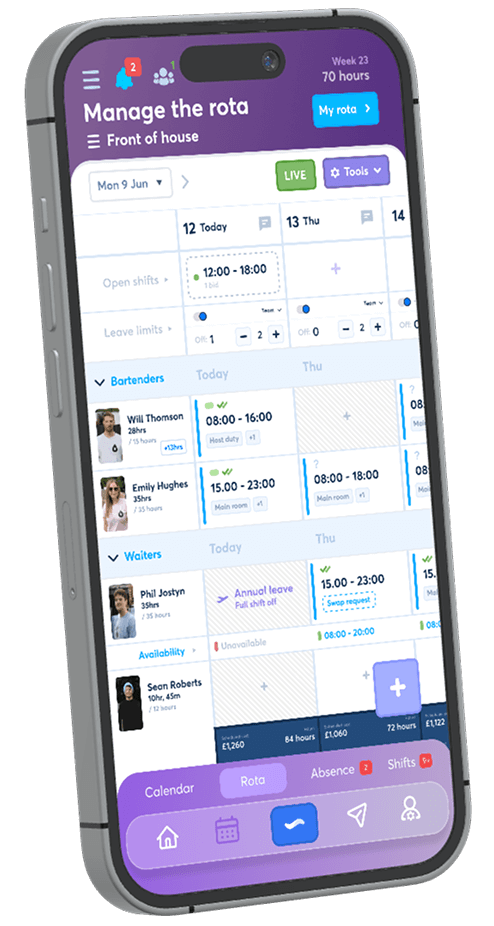
Create a rota, invite employees and test mobile clock-ins with a real working week. Compare scheduled and clocked duration, record lateness and test TOIL adjustments as part of the same review. The trial is free for 30 days, no credit card is required, and continued access costs just £1 per user per month.
Start your free trial