Spend less time chasing replies
Request availability for the period you are planning and keep responses together instead of searching through individual messages.

Collect employee availability before you build the rota, see when each person can work and spot unsuitable shifts while there is still time to change them.
FlowRota gives employees one simple place to share their working availability and gives managers the information they need beside the schedule. That means fewer message threads, less chasing and a clearer route from “When can you work?” to a published rota.
Availability changes the quality of rota planning. Instead of building a schedule first and discovering problems afterwards, managers can use the information employees have already supplied. FlowRota keeps that information connected to the rota, where it can support a better decision at the point a shift is assigned.
A dedicated staff availability app is not simply a digital version of a paper form. Its real value is making reliable information available earlier, reducing avoidable rota changes and giving employees a clear way to communicate when they can work.
Request availability for the period you are planning and keep responses together instead of searching through individual messages.
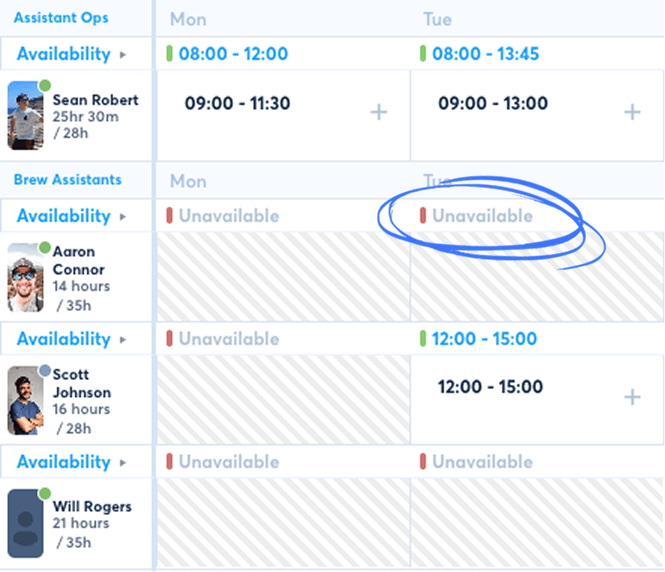
See the availability supplied by an employee while scheduling and deal with potential conflicts before the rota is published.
Build from current information, not assumptions based on last month’s pattern or a conversation somebody may have forgotten.
Employees know where to record when they can work, while managers retain control over the shifts that are ultimately assigned.
The workflow is deliberately straightforward. It supports everyday scheduling without turning availability into another complicated approval process.
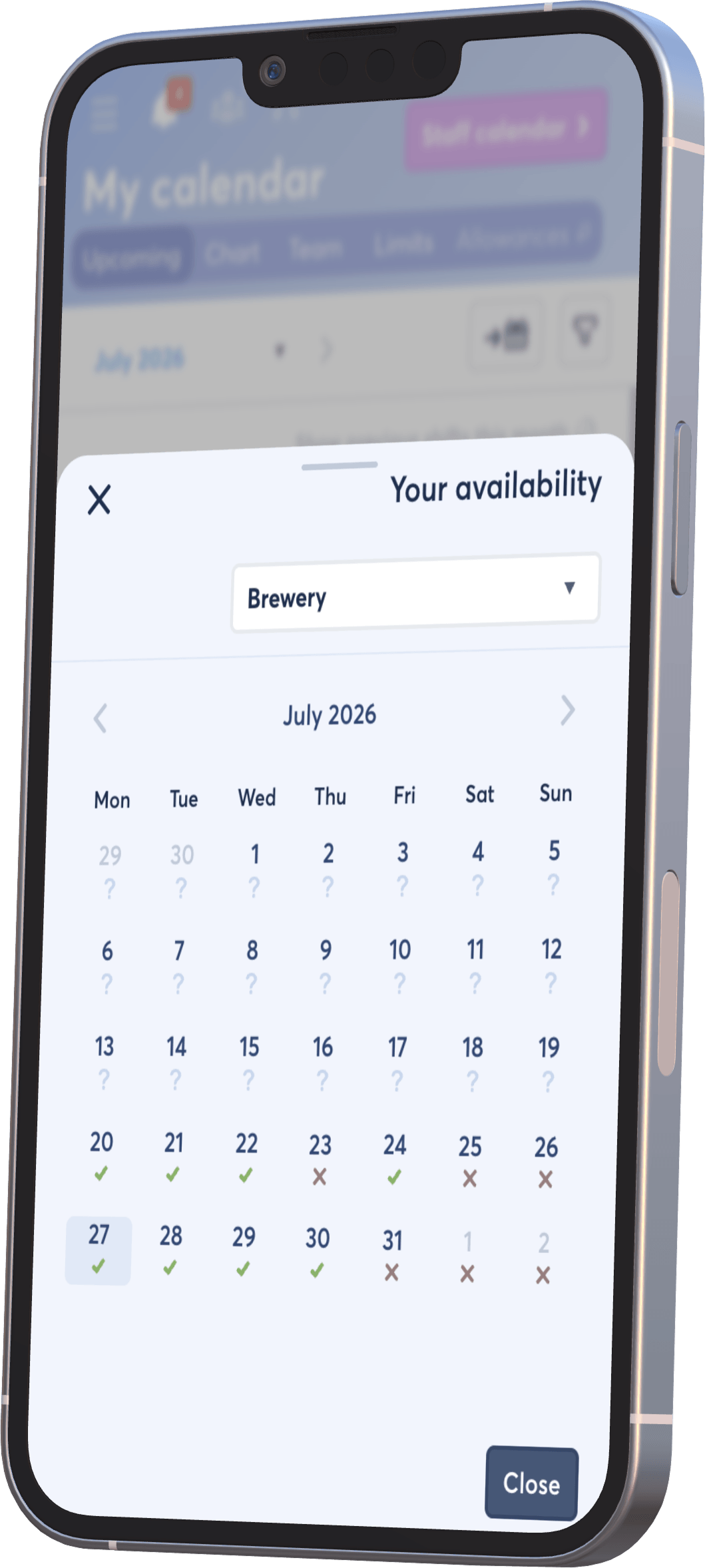
Employees can maintain their availability, and a manager can ask for fresh availability for a particular rota period.
Each person records when they can work, including separate available windows where their day is split.
Availability can be considered alongside existing shifts, leave, roles and the level of cover the business needs.
If a proposed shift falls outside the submitted availability, the manager receives useful context before finalising the rota.
 The manager stays in control.
Availability informs scheduling; it does not automatically decide
who must work.
Part-time and flexible employees are often asked for the same information again and again. FlowRota gives them a consistent place to enter availability from their phone or browser, without relying on a manager to copy every response into a separate spreadsheet.
An employee may be available all day, only during a certain window, or in two separate periods. Recording that detail helps managers understand the difference between “available on Tuesday” and “available on Tuesday between 08:00 and 12:00”.
Features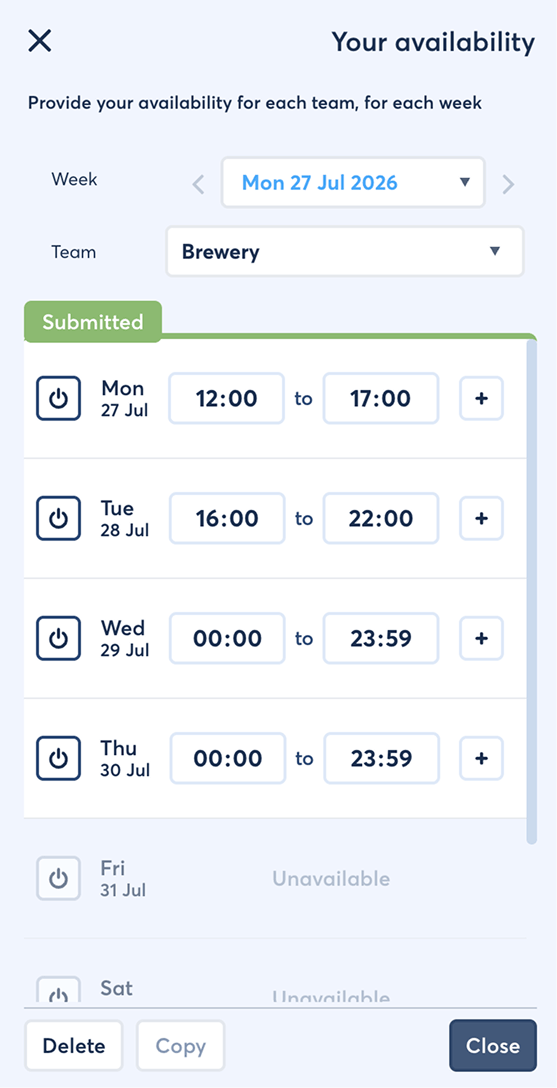
Availability is most useful when it appears at the moment a scheduling decision is made. FlowRota connects employee responses with staff rota planning so managers can compare who is able to work with the roles, locations and cover required.
Ask employees for availability that relates to the rota period you are preparing, instead of assuming an old response still applies.
FeaturesBenefit: Start the rota with more complete information and fewer unanswered questions.
Managers do not need to switch between the rota and a separate availability spreadsheet. The information is available where shifts are assigned.
FeaturesBenefit: Compare suitable employees more quickly without piecing together several sources.
FlowRota can highlight when a proposed shift is outside the times an employee supplied, giving the manager a chance to check the assignment.
FeaturesBenefit: Reduce the avoidable calls and last-minute changes caused by assigning somebody when they said they could not work.
These records can all affect a rota, but they answer different questions. Keeping the distinction clear helps employees communicate correctly and helps managers use each piece of information for the right purpose.
| Type of information | What it means | How it helps with the rota |
|---|---|---|
| Employee availability | The times an employee says they are able to accept work during the relevant period. | Helps a manager find suitable people and identify a possible conflict before assigning a shift. |
| Annual leave | A formal request for approved time away from work, normally deducted from a leave allowance. | Shows that approved absence must be protected when cover is planned. See leave management . |
| Fixed working pattern | An agreed or recurring pattern that describes the employee’s normal working arrangement. | Provides a starting point for regular scheduling, subject to the employee’s contract and business process. |
Availability should be applied consistently and in line with each employee’s contract, working arrangements and your organisation’s policies. It is useful scheduling information, not a replacement for those obligations.
Availability-led scheduling is especially valuable where working times vary from week to week. It also helps growing businesses replace informal processes before the number of employees, locations and message threads becomes difficult to manage.
Gather availability from bar, kitchen, venue and activity staff whose hours need to follow bookings, opening times and seasonal demand.
Schedule part-time and student employees around trading hours, changing cover needs and multiple roles. Explore retail rota software .
Request availability for the dates that matter, then build cover from the people who have confirmed they can work.
Give the relevant managers visibility without maintaining a different spreadsheet or group chat for every site and team.
A good rota still requires management judgement, but the process feels more considered when staff have a clear way to explain when they can work. Managers can use those responses consistently, and employees are less likely to receive a shift that immediately requires another conversation.
Employees do not need to guess which manager to contact or whether a message in a busy group chat has been seen.
A shared process makes it easier to explain when availability was requested and what information was available when the rota was prepared.
Catching unsuitable assignments early protects managers from rework and gives employees more confidence in the published rota.
The software works best alongside a clear, consistent process. These guides explore how to collect availability, why rota decisions affect the wider team and how a real FlowRota customer organises shift work.
Employee availability software gives staff a consistent place to record when they can work and gives managers that information while planning the rota. It replaces scattered messages, notes and spreadsheets with an availability record connected to scheduling.
Yes. Employees can enter and maintain their availability from FlowRota. Managers can also request availability for a particular scheduling period when they need up-to-date information before building the rota.
Yes. An employee can record separate available periods within the same day, which is useful when somebody can work in the morning and evening but not during the middle of the day.
FlowRota can show a conflict when a proposed shift sits outside the availability the employee has supplied. The warning gives the manager useful context while leaving the final scheduling decision with them.
No. Availability tells a manager when an employee is generally able to accept work. Annual leave is a formal request for time away from work and follows an approval process. FlowRota keeps both types of information available to the rota manager without treating them as the same thing.
No. Availability shows when an employee can work; it does not promise that work will be assigned. Managers still build the rota around business demand, roles, contracted arrangements and the needs of the wider team.
It is especially useful for businesses with part-time, flexible, seasonal or student employees, including hospitality, retail, leisure, care and event teams. It can also help any shift-based business that currently gathers availability through messages or spreadsheets.
FlowRota costs £1 per user per month after a 30-day free trial. No credit card is required to start the trial. Visit the pricing page for full details.
Invite your team, request their availability and see how the information supports rota planning. The trial is free for 30 days, no credit card is required, and continued access costs just £1 per user per month.
Start your free trial