How to Collect Employee Availability and Build Smarter Rotas


James Butler

Published: 22nd October 2025
A good rota does not start with empty boxes on a spreadsheet. It starts with knowing who is actually available to work.
For shift-based teams, employee availability is the difference between a rota that works on paper and a rota that survives real life. Staff may have childcare commitments, college timetables, second jobs, transport limits, caring responsibilities, preferred shift patterns or agreed limits on the days they can work. Ignore that information and the rota will usually come back as a stream of messages, complaints, swaps and last-minute gaps.
This guide explains how to collect employee availability before creating a rota, how to use it fairly, and how FlowRota helps UK businesses turn availability into calmer, more reliable scheduling.
What Employee Availability Actually Means
Employee availability is not just “days someone would like to work”. It is the scheduling information a manager needs before assigning shifts. That can include:
- regular days or times the employee can work
- days or times they cannot work
- temporary availability changes for a specific week
- preferred maximum hours or preferred shift lengths
- school, university, childcare or transport restrictions
- skills, roles or locations the employee can cover
It is important to be clear with staff: availability helps the business plan fairly, but it does not always guarantee a particular shift. The rota still has to balance demand, skills, cover, holidays, contracted hours and working-time rules.
Why Availability Should Come Before the Rota
Many rota problems are created before the rota is even published. A manager builds the schedule from memory, assumes someone can work Saturday, forgets a college day, or misses a message buried in WhatsApp. The rota may look complete, but it is built on weak information.
When availability is collected first, managers can spot the problems earlier:
- too few trained people available for a busy service period
- too many requests for the same day off
- employees being repeatedly scheduled outside their stated availability
- cover gaps caused by holidays, sickness or events
- possible rest issues from closing and opening shifts
This is not just about being nice. It reduces rework. A rota built around real availability is less likely to be ripped apart after publishing.
The Problem With Availability in Messages and Spreadsheets
Availability often starts neatly, then falls apart. One employee texts a manager. Another writes it on a paper form. Someone else mentions it in passing. A student changes their term timetable. A part-time worker picks up another job. A parent can now work Wednesdays but not Mondays.
If all of that information lives in different places, the rota becomes dependent on memory. That is where mistakes creep in:
- old availability is accidentally used
- managers miss one-off unavailable dates
- staff feel ignored because they already “told someone”
- shift swaps increase because the rota clashes with real life
- payroll and hours records become harder to reconcile later
A spreadsheet can show a rota, but it does not naturally manage the conversation that happens before and after the rota is built. That is why availability should be stored somewhere the manager can actually use while planning.
A Practical Availability Process for Managers
The best availability process is simple, repeatable and visible to both sides. For most small businesses, this works well:
- Set a cut-off date: Ask staff to submit availability before rota planning starts, not after the rota is published.
- Separate availability from holiday: Availability is usually about when someone can work; holiday requests should be tracked separately so absence and cover are clear.
- Collect one-off changes: Allow staff to submit temporary availability for a specific week, not just permanent patterns.
- Record the reason only when needed: Managers usually need to know the scheduling restriction, not every personal detail behind it.
- Review conflicts before publishing: Check whether the rota repeatedly clashes with availability or pushes the same people into unpopular shifts.
This gives managers structure without turning rota planning into a negotiation every week.
Availability Is Not the Same as Fairness
A common mistake is treating availability as the whole fairness picture. It helps, but it is only one part of the rota.
For example, one person may be available every weekend, but that does not automatically mean they should work every weekend. A student may only be available evenings, but that does not mean they should always get late finishes. A flexible employee may be willing to cover gaps, but relying on them every time can still lead to burnout.
A fair rota considers availability alongside:
- contracted or expected hours
- skills and role coverage
- weekend and evening distribution
- previous overtime and extra shifts
- rest between shifts
- holiday and absence levels
The goal is not to give everyone exactly what they want every week. The goal is to make decisions consistently, with better information and fewer surprises.
Availability and UK Working-Time Rules
Availability also affects compliance visibility. A staff member may say they are free to work a shift, but the manager still needs to consider rest, breaks and total hours before assigning it.
GOV.UK guidance says adult workers are generally entitled to 11 hours' rest between working days and a 20-minute rest break when working more than 6 hours . ACAS also summarises working-time rights including daily rest, weekly rest, rest breaks and holiday entitlement in its working time rules guidance .
This matters because availability can create a false sense of safety. Someone may be available for a morning shift, but if they closed late the night before, the rota may still create a rest issue. The same applies to shift swaps, extra cover and last-minute changes.
For more detail, see our guides to what counts as working time and common UK working-time breaches .
How FlowRota Handles Availability
FlowRota helps remove the messy middle stage between “staff told us when they can work” and “the rota is ready to publish”.
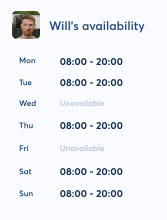
- Staff availability in one place: Employees can submit availability in the app instead of sending scattered messages.
- Clearer rota planning: Managers can use availability information while assigning shifts, reducing preventable clashes.
- Better handling of changes: When availability changes, the information is easier to review than a long message thread.
- Controlled shift swaps: Swap requests can be managed with oversight instead of being agreed informally outside the rota.
- Visibility before publishing: Managers can check availability, hours and coverage before the rota goes live.
This makes rota planning less reactive. Instead of publishing a rota and waiting for problems, managers can catch more of those problems before staff ever see the schedule.
Example: A Café Team With Mixed Availability
Imagine a café with twelve staff. Four are students, two have childcare limits, three prefer weekends, one can only work mornings, and two are flexible but already close to their normal weekly hours.
Without clear availability, the manager may build a rota that looks fully staffed but creates five problems: a student placed during a lecture, a parent scheduled outside agreed hours, one person working every Saturday, a last-minute swap that removes rest between shifts, and an understaffed Friday lunch because the wrong skill mix was used.
With availability collected first, those issues become visible earlier. The manager can see where cover is thin, where the team needs a fairer weekend rotation, and where an open shift should be offered before the rota is finalised.
Availability Checklist Before You Publish a Rota
Before publishing your next rota, check:
- Have staff had a clear deadline to submit availability?
- Are one-off unavailable dates separate from permanent patterns?
- Have holiday requests already been considered?
- Are the same people repeatedly getting the least popular shifts?
- Are any shifts assigned outside stated availability?
- Do shift swaps still need manager approval?
- Are rest periods and total hours still safe after changes?
- Can staff see the final rota clearly once it is published?
If you cannot answer those questions quickly, the rota process is probably relying too much on memory.
Conclusion
Collecting employee availability is not just an admin step. It is one of the foundations of a rota that staff can trust and managers can actually run.
When availability is visible before scheduling starts, businesses reduce avoidable conflicts, publish rotas with more confidence, and spend less time fixing problems after the event.
FlowRota helps bring availability, shifts, swaps and rota visibility into one place — so managers can build schedules from real information rather than memory, messages and guesswork.
This article is general guidance for UK shift-based teams and is not legal advice. Always check employment contracts, workplace policies and official guidance where rules are complex.
Simplify rota planning
Collect availability and create fairer rotas with ease
FlowRota lets staff submit availability in-app, helping managers reduce clashes, control swaps, plan cover and publish rotas with more confidence.
See how FlowRota manages availability