Create unlimited teams
Represent every department, function, site or operational group.

Create as many teams as your organisation needs, add any number of staff to each one and decide who can schedule, approve and view workforce information.
Every employee has one primary team and can join unlimited secondary teams, keeping cross-team scheduling flexible while paid leave costing and approval responsibilities stay clearly assigned.
FlowRota separates team membership from responsibility. Employees can work across departments, venues or functions, while admins and managers receive the access needed for their role and ordinary employees see only their own workforce records.
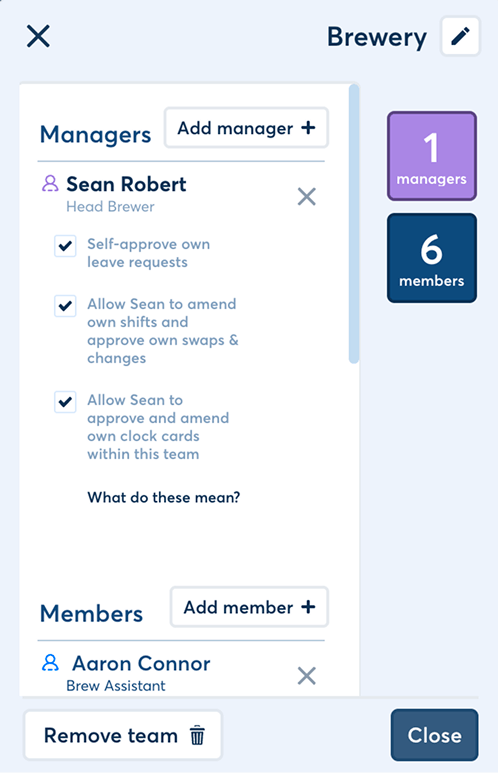
Organise complex staffing arrangements without making leave ownership, operational approvals or access to personal records unclear.
Represent every department, function, site or operational group.
Each team can contain as many employees as the organisation needs.
Give employees one primary team and unlimited secondary teams.
Cost paid leave to the primary team and route approval there.
Separate organisation-wide admin, team manager and employee views.
Decide whether managers can act on their own workforce records.
FlowRota can reflect a simple single-team business or a larger organisation where employees and managers work across several groups.
Create an unlimited number of teams, with no limit on the number of staff who can belong to each one.
Teams can representAn employee can belong to their primary team and as many secondary teams as required.
This supportsA manager can appear as an ordinary member in a team they manage, and managers can themselves have managers.
Why it helpsThe distinction keeps paid leave ownership stable even when the employee regularly works for several teams.
| Responsibility | Primary team | Secondary teams |
|---|---|---|
| Membership | Every employee has one | An employee can have as many as required |
| Paid leave cost | Paid annual leave and paid custom leave are costed here | Paid leave is not costed to these teams |
| Leave authority | Its managers approve, decline, amend or add leave and absence periods | Its managers cannot approve the employee’s leave |
| Shift scheduling | Managers can schedule the employee in the team | Managers can schedule the employee in each secondary team |
| Operational approvals | Managers can handle authorised team workflows | Managers can handle swaps, clock cards and timesheets for their team |
 One profile can work across the organisation.
Secondary membership expands where the employee can be scheduled; it
does not move paid leave cost or leave approval away from their
primary team.
One profile can work across the organisation.
Secondary membership expands where the employee can be scheduled; it
does not move paid leave cost or leave approval away from their
primary team.
FlowRota keeps organisation-wide control, team management and individual employee access distinct.
Admins can access and manage all FlowRota functionality for everyone in the organisation.
Admin access includesBest for: trusted users responsible for FlowRota across the whole business.
Managers can schedule staff and handle the approvals available to them for the teams they manage.
Manager access can includeBoundary: managers receive management tools, not unrestricted admin control.
Users without admin or manager access see their own workforce information and do not see manager functionality.
Employees can see their ownBoundary: employees cannot open manager scheduling or approval screens.
| Action | Admin | Primary-team manager | Secondary-team manager | Employee |
|---|---|---|---|---|
| Configure organisation and permissions | Yes | No | No | No |
| Schedule staff in a managed team | Yes | Yes | Yes | No |
| Approve employee leave | Yes | Yes | No | No |
| Manage team swaps, clock cards and timesheets | Yes | Yes | Yes | No |
| View personal employee records | Everyone | Managed team | Managed team | Own records only |
Leave follows the employee’s primary team, while day-to-day shift workflows can be handled by managers of the team where the work takes place.
A primary-team manager or administrator can approve, decline, amend or add the employee’s leave and absence periods.
This keeps clearExplore the manager leave workflow and employee leave requests .
Managers of a secondary team can still run the work assigned there, even though they do not own the employee’s leave.
They can manageSee how permissions connect with shift swaps and employee clock-ins .
A manager may also appear as an employee in a team they oversee. FlowRota lets administrators decide when that overlap should permit self-management and when another person must provide oversight.
If a manager manages their own primary team, an administrator can decide whether they may approve, decline, amend or add their own leave and absence periods.
Important boundaryA separate permission controls self-management of operational records within teams the manager both manages and belongs to.
It can coverAdministrators can separately decide whether a manager may approve, amend or decline their own clock card.
This control applies when
Self-management is a deliberate permission, not an assumption.
Read the
FlowRota self-approve permissions guide
for the full setup rules.
Ordinary employees do not need manager screens to understand their schedule, time away and hours. Their view stays personal even when they belong to several teams.
Non-managers can see their own shifts, hours, leave, absence, pay and absence rank. Work from primary and secondary teams remains connected to the same user without exposing scheduling or approval tools.
Employees can use FlowRota toClear team and permission rules help everyone understand where work belongs, who can approve it and which information each user should see.
Add employees to several teams without creating duplicate user profiles.
Use the primary team for paid leave cost and the authority to approve it.
Let secondary-team managers schedule work and handle its operational approvals.
Decide explicitly whether managers can edit or approve records about themselves.
Team membership determines where staff can be scheduled and which managers can act on the records created there.
Teams organise the employees, managers, shifts and approval responsibilities that belong together in FlowRota.
A business can create an unlimited number of teams, and each team can contain an unlimited number of staff.
Yes. Every employee has one primary team and can belong to as many secondary teams as required.
The primary team owns paid annual leave and paid custom-leave costing and determines which team managers can approve the employee’s leave. Secondary teams allow the employee to be scheduled and managed elsewhere without transferring those leave responsibilities.
Paid annual leave and paid custom leave are costed against the employee’s primary team.
Leave can be approved by a manager of the employee’s primary team or by a FlowRota administrator. Managers of secondary teams cannot approve that employee’s leave.
They can schedule the employee in that team and manage team workflows such as shift swaps, clock cards and timesheets, subject to the organisation’s settings, but they cannot approve the employee’s leave.
An administrator can access and manage all FlowRota functionality for everyone in the organisation.
Managers can schedule staff and approve the records and requests they are authorised to manage for their teams. They do not receive unrestricted administrator access.
Employees without admin or manager access see their own rota information, including their shifts, hours, leave, absence, pay and absence rank. They do not see manager functionality.
Only when the manager manages their own primary team and an administrator has enabled the relevant self-approval permission. Otherwise another authorised primary-team manager or administrator must handle it.
Administrators can decide whether managers who are also members of a team may add, amend or delete their own shifts, manage their own timesheets, approve or deny their own swaps, and approve or decline their own shift amendments.
Administrators can decide whether a manager may approve, amend or decline their own clock card when it belongs to a team they manage, whether that team is primary or secondary.
FlowRota costs £1 per user per month after a 30-day free trial. No credit card is required to start the trial. Visit the pricing page for full details.
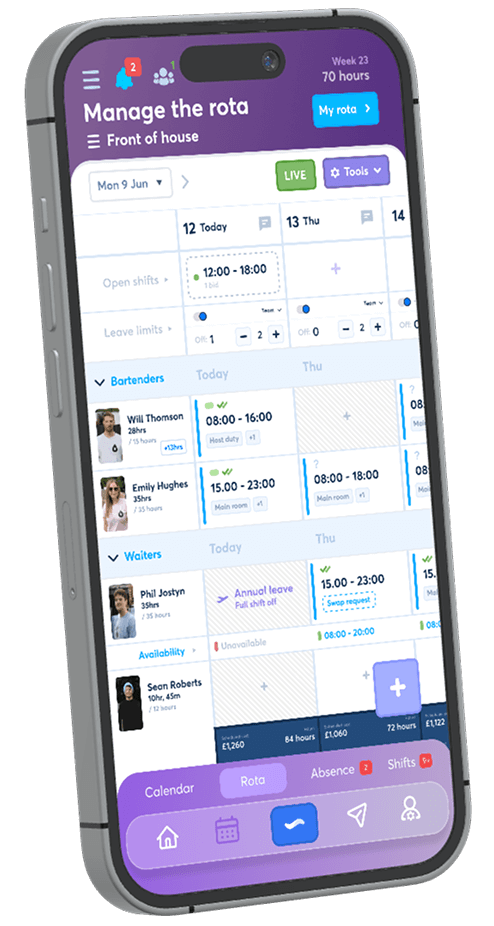
Create unlimited teams, schedule employees across them and keep admin, manager and employee permissions clear. The trial is free for 30 days, no credit card is required, and continued access costs £1 per user per month.
Start your free trial