The spreadsheet keeps changing
One version is emailed, another is printed, then a manager makes a last-minute change. Staff are left checking which rota is right.
Simple UK staff scheduling for small teams
Your team has outgrown Excel and WhatsApp. Your rota software shouldn't feel like another full-time job. Build shifts, manage holiday and keep everyone up to date in one simple place — for just £1 per active user/month + VAT.

When the old system stops working
A spreadsheet or group chat can work when everyone has the same shifts each week. It gets harder when staff have different availability, someone books holiday, or Saturday's rota changes again.
One version is emailed, another is printed, then a manager makes a last-minute change. Staff are left checking which rota is right.
Shift questions, cover requests and holiday messages get buried in the chat. A message being sent doesn't always mean the schedule was updated.
Availability, leave, lateness and worked hours live in separate places — so the same information gets checked and copied over and over.
A better way to work
Excel and WhatsApp still have their uses. The difference is that FlowRota keeps the schedule and the information around it connected.
| What the team needs | Excel or WhatsApp | FlowRota |
|---|---|---|
| One current rota | Files and screenshots can be out of date. | Managers update a single live rota staff can check. |
| Last-minute shift changes | Messages and manual resending. | Change shifts and send relevant notifications. |
| Holiday and availability | Often kept in separate tabs, forms or chats. | Leave requests and availability sit alongside scheduling. |
| Finding extra cover | Ask around and keep track of replies manually. | Use open shifts and shift swap workflows. |
| Knowing hours worked | Reconcile the rota with clock-ins or timesheets. | Compare scheduled and actual hours in the same system. |
| Cost to get started | Existing tools may already be available. | 30 days free, then £1 per active user/month + VAT. |
One platform, useful everyday tools
You don't need separate subscriptions for scheduling, holiday requests, shift updates and staff hours. All FlowRota features are included in the same plan.
Create, copy and adjust shifts for fixed and flexible team members. Keep roles and locations clear.
Explore staff scheduling →Keep employees on the current rota with updates by app and email, rather than another group-chat screenshot.
Explore notifications →See when part-time or flexible employees can work before assigning them a shift.
Explore availability →Receive leave requests, check who is off and track absence without a second spreadsheet.
Explore leave management →Manage shift swaps and make open shifts available without losing track of the final rota.
Explore shift swaps →Use clock-in records and timesheets to compare planned and actual hours, ready for reporting.
Explore timesheets →See the actual software
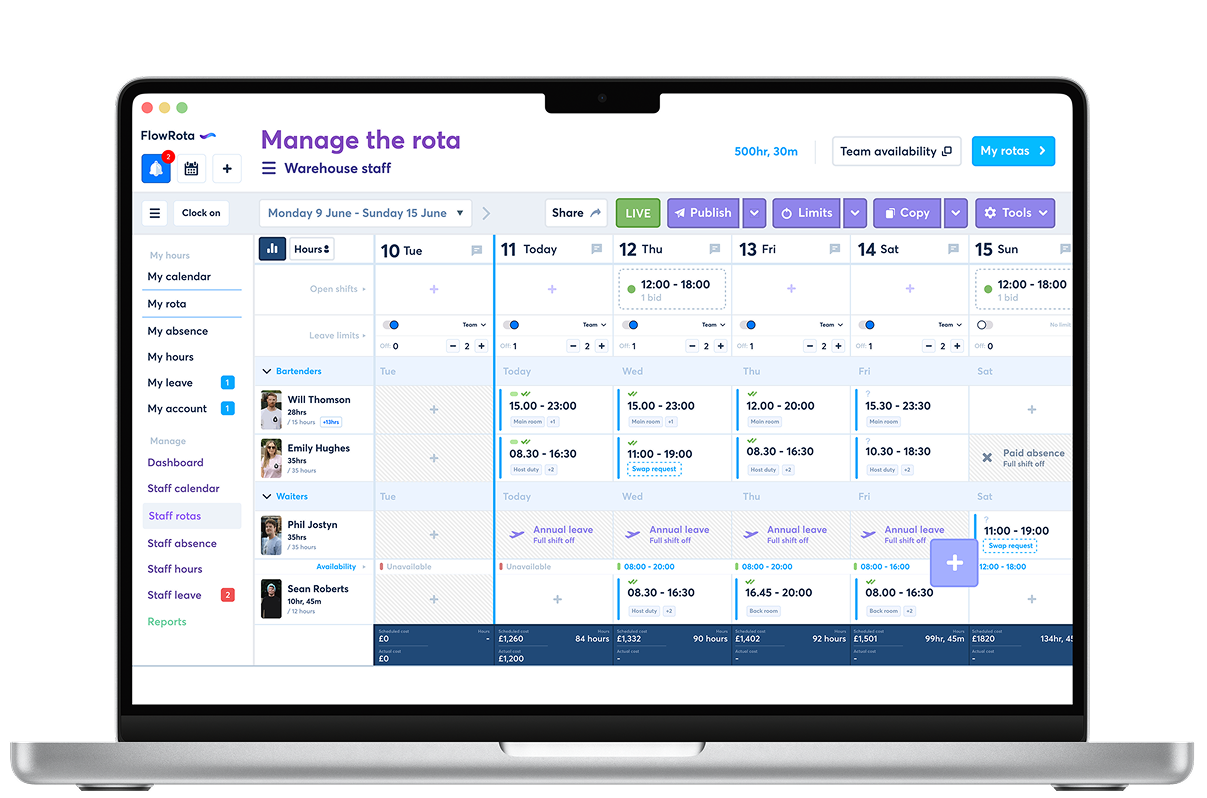
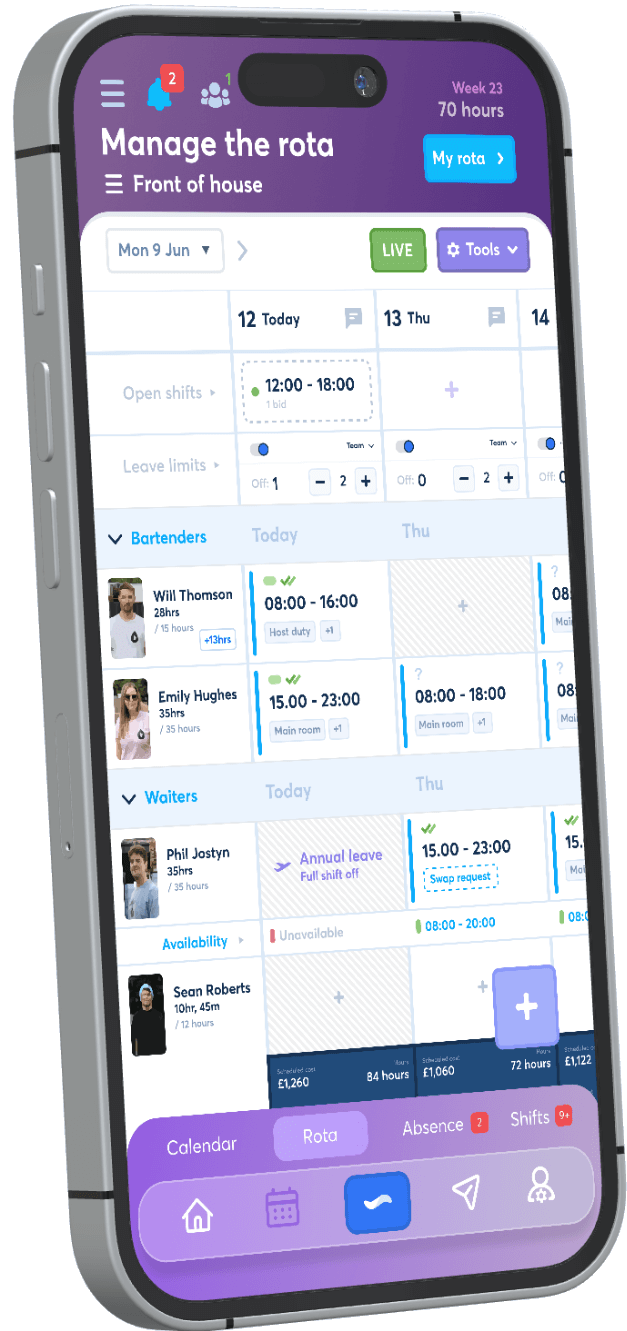
Managers can schedule and update shifts, while employees check the published rota and changes on supported devices. The screenshots below show the FlowRota product, not a concept mock-up.
Fits the way smaller teams work
FlowRota works for small shift-based teams, whether your rota stays mostly the same or changes with demand. Here are some practical examples.
Arrange busy weekend cover, schedule bar and kitchen roles, and respond when somebody needs a shift swap.
Keep opening and closing shifts covered, manage part-time availability and see who's on the shop floor.
Plan day and night cover, assign different roles, and make leave or absence visible before publishing shifts.
Schedule work across sites, track clock-in records and keep employees informed when locations or shifts change.
Simple, transparent pricing
Plus VAT, after your 30-day free trial.
Move the slider to estimate the monthly subscription after your free trial. Change staff numbers as your business grows.
Excluding VAT. Based on £1 per active user each month; your first 30 days are free.
Easy to get started
No project manager or complex rollout needed. Start with the people and shifts you already have, then add the features you need.
Start your 30-day free trial without a payment card. Set up your business and the team you want to schedule first.
Add employees, roles and usual working patterns. Copy regular shifts and adjust them around availability and leave.
Give staff access to the live rota. When something changes, update the schedule rather than sending another version around.
Used by a real UK business
See how a working hospitality business uses FlowRota, rather than just reading a feature list.
Read the Polly's case study →"We stopped relying on spreadsheets and staff always see the latest rota. It’s saved us hours every week."Sean Robert, Polly's Brew Co. — as featured on the FlowRota website
Small business rota software FAQs
Use one shared rota that staff can check and managers can update. For a very small team with an unchanging schedule, a spreadsheet can be enough. Rota software becomes useful when shifts change, holiday requests need approval, or you need availability and worked hours in the same place.
After the trial, FlowRota costs £1 per active user per month plus VAT . That means a team with 10 active users costs £10/month plus VAT, and all features are included. See our pricing page for full details.
Yes to the trial, no to a long-term contract. You can use FlowRota free for 30 days without entering a payment card. After that, subscriptions are billed monthly, with no setup fee or long-term commitment.
Yes. Add your team and create your usual shifts in FlowRota, then make it the current rota employees check. You can move the next scheduling period across first rather than changing your whole process at once. Read about moving from Excel or moving from WhatsApp .
Yes. Employees can submit leave requests and update availability. Managers can review requests and use that information when building the rota, rather than piecing together messages.
No. FlowRota billing is based on active users . Archived staff are not included in your active-user subscription count, and they can be reinstated when needed.
Yes. Employees can access the current rota and relevant shift updates using FlowRota on supported mobile devices. Managers can update shifts without having to send everyone a fresh screenshot.
Try FlowRota with your actual team, build your next schedule and see whether a live rota makes work easier. Every feature is included, and your first 30 days are free.
30 days free · No card required · No long-term contract · £1 per active user/month + VAT thereafter