

How to Create a Free Staff Rota Online: Step-by-Step Guide

James Butler

Published: · UK staff rota guide
Introduction
Need to organise your staff shifts without wrestling with a spreadsheet or paying for software you do not yet need? A weekly rota does not have to be complicated. Start with the names of your employees, decide who works on each day, enter their hours and check that the shifts provide the cover your business needs.
FlowRota's free staff rota generator lets UK small businesses do exactly that in a web browser. You can start immediately without creating an account, then move the schedule into FlowRota Lite when you want staff to view their shifts in an app.
Quick answer
How do you create a staff rota for free?
Go to flowrota.com/rota - start with the sample rota or a blank week, add up to 10 team members, schedule their shifts and review the weekly hours. You can then select Save & share rota to create a free FlowRota Lite account and let employees view their rotas in the mobile app.
No sign-up is needed to build the initial rota. FlowRota Lite is free to use for basic scheduling, with user and feature limits. Leave requests, timesheets and GPS clocking are part of FlowRota's separate paid plan.
What is FlowRota Lite?
FlowRota Lite is the forever-free, streamlined version of FlowRota for teams that primarily want to create, maintain and share employee shift rotas. Its entry point is the free online rota generator at flowrota.com/rota
The distinction matters: the rota generator is the editable schedule you can use immediately in your browser. FlowRota Lite is the free account option that lets you keep the rota and share it with staff through the FlowRota app. Neither is a promise that the full feature set of the paid software is free.
The free tool is designed for the core task of weekly rota planning: names, shifts, start and finish times, breaks, useful labels, notes and a clear view of scheduled hours. It's particularly useful for a small team that has outgrown passing a spreadsheet or screenshot around a WhatsApp group.
How to make a free staff rota online: 6 steps
Here's a practical workflow you can follow today. You do not need to download Excel, enter card details or register before trying the builder.
1. Open the free weekly rota builder
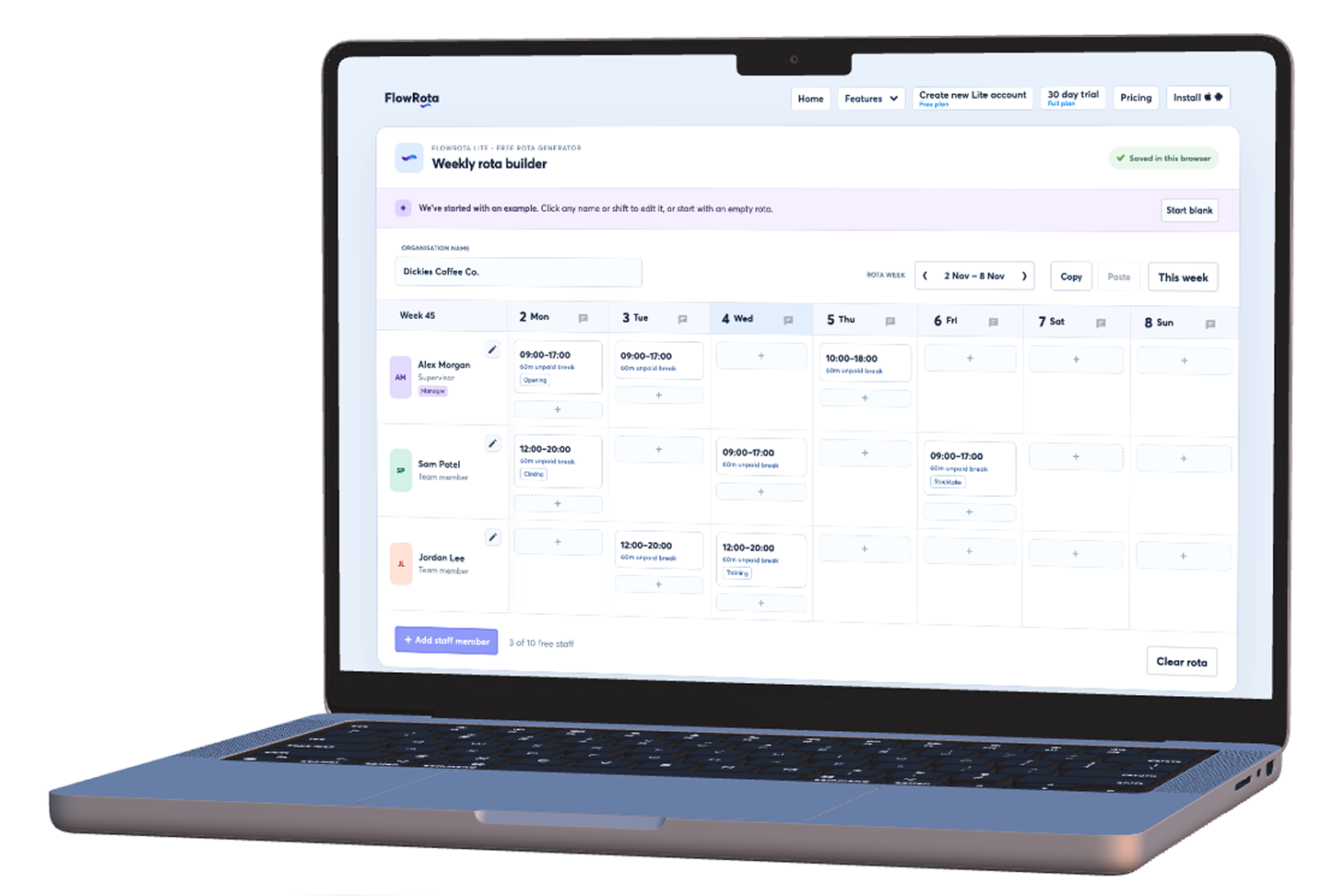
Visit FlowRota's free rota generator - A Monday-to-Sunday staff rota appears directly on the page. It may already contain example staff and shifts to demonstrate how it works. Keep those as a starting point or select Start blank to clear the example and build your own.
2. Name your organisation and add employees
Enter your business or team name. Add each person's first and last name and job title, then indicate whether they are a manager. For your own profile, select This is me. This identifies the person who will set up the rota as a manager when saving it in FlowRota Lite, so it is worth checking before you share the rota.
The free generator currently allows up to 10 team members including managers.
3. Add shifts, times, breaks and duties
Choose an employee and a day, then enter the shift's start and end times. Add the break duration and choose paid or unpaid. A 09:00–17:00 shift with a 30-minute unpaid break contributes 7 hours 30 minutes of scheduled working time; the same shift with a paid break contributes 8 hours.
Add optional shift tags to identify duties such as Opening, Closing, Training or Stocktake. You can also schedule multiple shifts for the same employee on the same day.
4. Drag, duplicate and copy shifts to other weeks
Use drag and drop to move shifts to a different slot. If someone works a repeating pattern, duplicate the shift instead of entering its times again. The week selector allows you to move between Monday-to-Sunday schedules, and the copy-and-paste week controls help reuse a similar rota for another week.
Duplicating a week is a starting point, not a final approval. Check dates, availability and any changes to business opening hours before staff rely on it.
5. Review scheduled hours and add day notes
The generator displays the number of team members, planned shifts and scheduled hours. Unpaid breaks are excluded from those scheduled hours; paid breaks are included. Day notes can hold useful reminders, such as an early delivery or a changed opening time.
The generator accepts overnight shifts where the end time is earlier than the start time. For overnight work crossing a daylight-saving change, double-check the hours separately: the generator's calculation does not account for the clocks changing.
6. Save and share your rota with employees
Once you're happy with the schedule, select Save & share rota . You'll be taken into the FlowRota Lite account setup to enter your email and create a password. Then you can invite colleagues to view their shifts through the FlowRota app on supported mobile devices.
Worked example: making a rota for a two-person cleaning team
Imagine a small business called Loka Cleaning. Zack is its general manager and works Monday to Friday, 11:00–19:00, with a 45-minute paid break. Stella works on Tuesdays and Wednesdays, 08:00–16:00, also with a 45-minute paid break.
Illustrative rota — example staff and hours
| Employee | Mon | Tue | Wed | Thu | Fri | Weekly hours |
|---|---|---|---|---|---|---|
| Zack (Manager) | 11–19 | 11–19 | 11–19 | 11–19 | 11–19 | 40 h |
| Stella (Support) | Off | 08–16 | 08–16 | Off | Off | 16 h |
| Total | 8 h | 16 h | 16 h | 8 h | 8 h | 56 h |
All shifts include paid 45-minute breaks, so the full eight hours per shift count towards scheduled hours. The example assumes no shifts at the weekend and does not represent actual FlowRota customer data.
To build it, add Zack and select both Manager and This is me . Create his first 11:00–19:00 shift and duplicate it across the working week. Add a Closing tag if useful. Then add Stella as a non-manager, make her Tuesday shift from 08:00 to 16:00, and duplicate it to Wednesday.
The rota now makes the overlap obvious: both employees are working on Tuesday and Wednesday, while Zack covers the other weekdays alone. You can change those shifts directly if workload or staffing needs change.
What can you do with FlowRota's free rota generator?
The free builder focuses on the everyday information a manager needs to put into a workable weekly rota.
| Feature | What it helps with |
|---|---|
| Up to 10 staff | Plan one small team's shifts with employee names, job titles and managers. |
| Seven-day weekly view | See who works Monday to Sunday and move between weeks. |
| Drag and drop | Rearrange shifts quickly rather than rewriting the schedule. |
| Shift duplicate and week copy | Reuse repeating patterns while leaving room for changes. |
| Start/end times and breaks | Include paid or unpaid breaks in scheduled-hour calculations. |
| Shift tags and day notes | Add duties such as Training or Closing and messages for a day. |
| Overnight shifts | Plan a shift that ends the next day; manually check clock-change nights. |
| FlowRota Lite account | Keep and share the rota so employees can view their shifts in the app. |
Should you keep the rota in your browser or use FlowRota Lite?
The best option depends on whether you are testing a schedule for yourself or running an ongoing rota with employees.
Using the free generator without signing up
You can create and edit the rota directly in the browser. The draft is saved locally, which is convenient if you are experimenting with shift patterns or preparing a schedule on one computer. However, browser storage is not a reliable backup . Clearing site data, using private browsing or moving to another device may mean the draft is unavailable.
Using the free FlowRota Lite account
Choose Save & share rota when you want your schedule kept in an account and accessible to the team through the FlowRota app. This is the natural next step when you no longer want to send revised spreadsheet files or screenshots every time a shift changes.
FlowRota Lite is intended for basic scheduling. It has its own feature and user limits, so check the free plan fits your business before moving a large or complex rota into it.
Free rota generator, Excel or paid rota software: which should you choose?
These options solve different problems. A spreadsheet is useful if you want a downloadable workbook. The free online builder is good for a quick editable schedule. Paid FlowRota brings scheduling together with more involved staff-management workflows.
| Option | Best for | What to expect |
|---|---|---|
| Free rota generator + Lite | Small teams wanting fast weekly scheduling and a free mobile rota. | Build without signing up; create a free Lite account to keep and share shifts. User and feature limits apply. |
| Excel / Google Sheets template | Managers who prefer their own spreadsheet file and formulas. | Download and edit a workbook, then manage sharing and version control yourself. |
| Paid FlowRota | Teams needing leave, attendance and actual-hours management as well as rotas. | £1 + VAT per active user per month after the 30-day free trial, with features such as holiday requests, timesheets and clocking. |
If your immediate problem is simply “I need a rota ready for next week”, start free. If you later need to collect employee availability , manage holiday requests or approve timesheets , review the paid plan separately. Our Excel vs rota software comparison explores the wider trade-offs.
Who is a free online staff rota maker useful for?
The same simple rota format can work across different industries, provided you check the real staffing needs and responsibilities of your own business.
- Cafés and restaurants: organise opening, service and closing shifts, and label specific duties such as food preparation or stocktake.
- Retail shops: make early and late shift cover visible across trading days, then copy a regular schedule into a new week.
- Cleaning businesses: plan a small mobile or on-site team around client visits and regular hours.
- Small hospitality venues: share one rota with part-time staff who need to check their shifts on a phone.
- Other shift-based workplaces: visualise staff cover before moving to more sophisticated scheduling or time tracking.
For regulated or safety-critical settings, a rota grid is only one part of workforce planning. Managers must also check required staffing levels, skills, breaks and applicable working-time rules.
Five common mistakes when making a staff rota
- Copying last week's shifts without checking cover. Trading patterns, holidays and individual circumstances can change, even when the rota looks familiar.
- Forgetting unpaid breaks. A shift from 09:00 to 17:00 is not eight hours of paid work if it includes an unpaid 30-minute break.
- Leaving duties unclear. Add a shift tag or note when staff need to know who opens, closes or handles deliveries.
- Keeping only a browser draft. Use a Lite account when a rota needs reliable account-based access and sharing beyond one browser.
- Sending multiple versions to staff. Agree where employees should check the latest schedule rather than relying on old screenshots.
A rota is useful only if the shifts are accurate and everyone knows which version is current. Spend a few minutes reviewing the finished week before you share it.
Free staff rota generator: frequently asked questions
Is FlowRota Lite really free?
Yes. The free rota generator lets you create a schedule without signing up, and FlowRota Lite is a forever-free option for saving and sharing rotas. The free tools have user and feature limits.
Do I need an account to use the free rota generator?
No. Open flowrota.com/rota , start with the example or a blank week and build a rota in your browser. Create a free Lite account only when you want to save and share the rota online.
How many employees can I schedule for free?
The FlowRota free rota generator currently allows up to 10 team members. You can add each person’s name, job title and manager status.
Can my employees see their rota on a phone?
Yes. Save and share your rota through a free FlowRota Lite account, then invite team members to log in and view their shifts in the FlowRota mobile app.
Does the rota generator calculate working hours?
Yes. It totals scheduled hours from shift start and end times. Paid breaks count toward the scheduled hours total; unpaid breaks are deducted.
Can I copy a rota from one week to another?
Yes. The generator includes a week selector and copy-and-paste controls so you can reuse a schedule and edit it for a different week.
Can I schedule overnight shifts?
Yes. If the end time is earlier than the start time, the generator treats the shift as overnight. Its scheduled-hour calculation does not adjust for daylight-saving clock changes.
Will my rota be saved if I close the browser?
The generator saves a draft locally in the browser. It is not a dependable long-term or cross-device backup: clearing browser data or changing devices can remove access to that draft. Use a FlowRota Lite account to keep and share it.
Does the free plan include holiday requests, timesheets or GPS clocking?
No. These are among the additional features in the paid FlowRota plan. FlowRota Lite focuses on straightforward staff scheduling and sharing rotas.
What if I would rather use Excel?
You can use FlowRota’s free Excel and Google Sheets rota templates instead. The online rota generator is more convenient when you want to drag and drop shifts and eventually share one schedule through an app.
Related resources and free rota tools
If you need to plan beyond one weekly schedule, these FlowRota resources explain the available approaches in more detail.
- Free staff rota generator and FlowRota Lite — build a rota immediately without signing up.
- Free Excel and Google Sheets rota templates — downloadable weekly and rolling planning formats.
- Staff rota planning guides — practical guidance on shift scheduling and staff management.
- Excel vs rota software — compare spreadsheet scheduling with an app.
- FlowRota pricing and paid features — see when a wider scheduling platform might be useful.
Your next rota starts here
Create a free staff rota in minutes
Start with an example or a blank week. Add your team, plan shifts, review scheduled hours and move into FlowRota Lite whenever you're ready to share the rota with staff.
- No sign-up needed to start building
- Up to 10 team members
- Drag-and-drop shifts and weekly copy controls
- Save and share in a free FlowRota Lite account
