

Leave request date period
Policy
By default, users may only request leave that falls within the current business year configured for your organisation. Requests for dates in the following business year are blocked unless an administrator enables the appropriate setting.
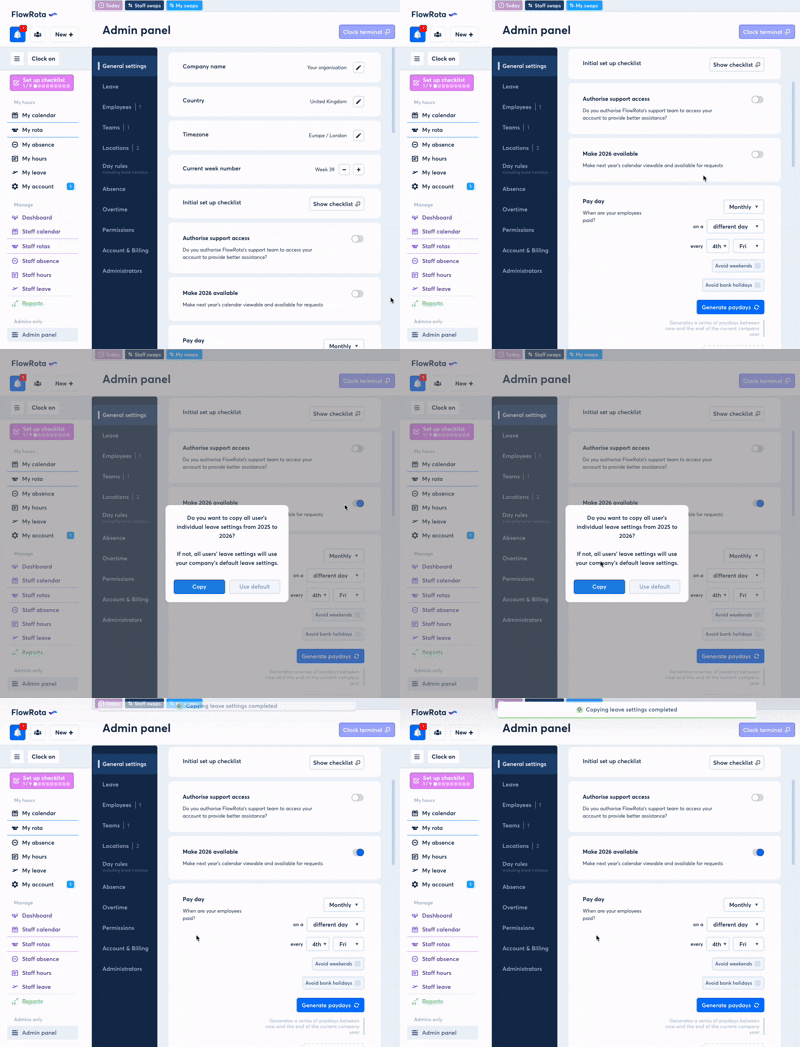
To permit leave requests for the upcoming business year, an administrator must enable Make next year available in the Admin panel. When enabled, users will be able to request leave that falls inside the next business year.
Manage this setting here: Admin
Copy leave settings to next year
When enabling 'next year', FlowRota will ask you whether you want to copy all staff leave settings to the new year. If you choose not to, each staff member's leave balances for annual leave and any custom leave types will use the default allowance set in the company settings.
If you need assistance changing the setting or confirming your business year configuration, contact the FlowRota support team.
Notes
The Make next year available toggle is temporary — it reverts off automatically at the start of the new business year (which is determined by your organisation’s year start date).
If you need assistance changing the setting or confirming your business year configuration, contact the FlowRota support team.