

Getting Started
Introduction
FlowRota enables organisations to manage staff rotas, track hours and leave, and simplify workforce planning. This guide explains how to create an account and begin using FlowRota, whether through the quick launch option or full sign-up.
Creating an Account
There are two methods available for creating an account:
- Option 1: Immediate access with no initial details required.
- Option 2: Full sign-up form capturing email address, password, and company name.
Option 1 — Quick Launch
Users can begin using FlowRota immediately by visiting https://app.flowrota.com/launch . This option provides instant access to the rota editor, allowing users to create and edit shifts without delay.
While users can explore and create rotas freely, certain features—such as adding team members or creating teams—require completion of account details. When accessing these functions, users will be prompted to provide their name, email address, and password.
Option 2 — Full Sign Up
Users who prefer to register with full details can do so at https://app.flowrota.com/signup . This form captures an email address, password, and company name, providing a complete account from the outset.
Completing Your Account
Completing an account unlocks access to advanced functionality, including managing users, creating teams, and configuring company settings. Completing registration does not start a paid subscription—users remain within their free trial period.
The Getting Started Checklist
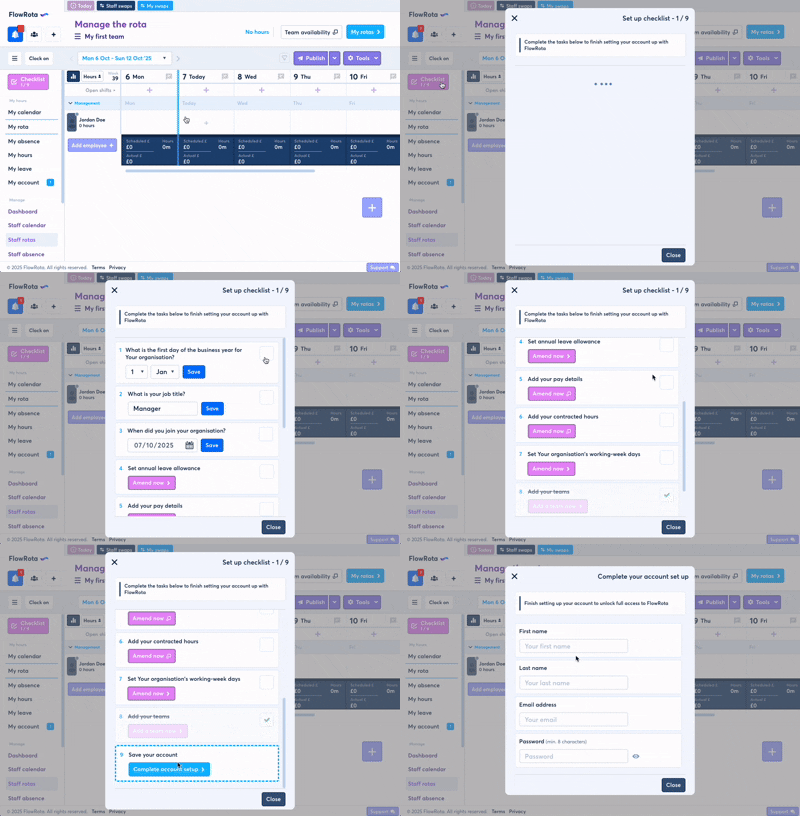
You will see checklist button upon creating your new account. This checklist assists in configuring key details to enable accurate functionality, including:
- Personal pay, work, and leave data (salary, hourly rate, contracted weekly hours, work pattern, and leave allowances)
- Organisation name and working week settings
- Default company annual leave rules
- Adding teams
- Setting the date you joined the company
If the date you joined the company is before the day you created your FlowRota account, the checklist will ask you to confirm if you have taken any leave, absence and whether you have worked this year so that your leave and hours balances can be calculated correctly.
Free Trial
FlowRota offers a 60-day free trial with no payment details required. Users can explore all functionality during this period and upgrade to a paid subscription at any time.